Don't see departments under System menu

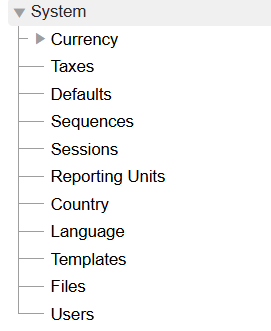
Hello all: According to the manual, I should see a Departments option under the System menu: https://book.ledgersmb.org/dev/split-book/sec-company-config-system-menu.h tml#subsec-company-config-departments But, when I look at my system menu, I do not see that option, see attached. Any idea why it is missing? Thank you, Neil -- Neil Aggarwal, (972) 834-1565, https://propfinancing.com We offer 30 year loans on single family houses!

Hi Neil, On Wed, Aug 19, 2026 at 11:57 PM Neil Aggarwal <neil@propfinancing.com> wrote:
According to the manual, I should see a Departments option under the System menu: https://book.ledgersmb.org/dev/split-book/sec-company-config-system-menu.htm...
The section you're reading is out-dated: since 1.4, Departments and Projects have been generalized into "Reporting Units". There are many more reporting units than just "departments" or "projects", as you can see under "System > Reporting Units". They have to be explicitly enabled and then declared relevant for various parts of the application: Sales(AR+Orders)/Purchases(AP+Orders)/GL/Fixed Assets/Manufacturing. These checkmarks indicate whether the dimension will show up on data entry and search screens for that type of functionality.
But, when I look at my system menu, I do not see that option, see attached.
Any idea why it is missing?
Yes: an update to the book. This book-mismatch is now tracked via: https://github.com/ledgersmb/ledgersmb-book/issues/155 Thanks for reporting! We'll address asap. -- Bye, Erik. http://efficito.com -- Hosted accounting and ERP. Robust and Flexible. No vendor lock-in.
Departments and Projects have been generalized into "Reporting Units"
OK, I created two reporting units and made them active. See the attached screenshot. Next, I am trying to figure out how to record a payment for them. According to the book https://book.ledgersmb.org/dev/split-book/sec-business-processes-payment-pro... I can go to Cash & Banking > Receipt and enter a single transaction for a customer. Looking further, a customer is a contact with a customer credit account. I added two contacts, see attached. But, when I try to add a customer credit account to Property1, I enter 1 in the customer number field and hit Update. The screen reloads and deletes the information I typed. Thank you, Neil -- Neil Aggarwal, (972) 834-1565, https://propfinancing.com We offer 30 year loans on single family houses!
-----Original Message----- From: Erik Huelsmann <ehuels@gmail.com> Sent: Wednesday, August 19, 2026 5:12 PM To: neil@propfinancing.com Cc: users@lists.ledgersmb.org Subject: Re: [ledgersmb-users] Don't see departments under System menu
Hi Neil,
On Wed, Aug 19, 2026 at 11:57 PM Neil Aggarwal <neil@propfinancing.com> wrote:
According to the manual, I should see a Departments option under the System menu: https://book.ledgersmb.org/dev/split-book/sec-company-config-system-me nu.html#subsec-company-config-departments
than just "departments" or "projects", as you can see under "System > Reporting Units". They have to be explicitly enabled and then declared relevant for various parts of the application: Sales(AR+Orders)/Purchases(AP+Orders)/GL/Fixed Assets/Manufacturing. These checkmarks indicate whether the dimension will show up on data entry and search screens for that type of functionality.
But, when I look at my system menu, I do not see that option, see attached.
Any idea why it is missing?
Yes: an update to the book. This book-mismatch is now tracked via: https://github.com/ledgersmb/ledgersmb-book/issues/155
Thanks for reporting! We'll address asap.
-- Bye,
Erik.
http://efficito.com -- Hosted accounting and ERP. Robust and Flexible. No vendor lock-in.
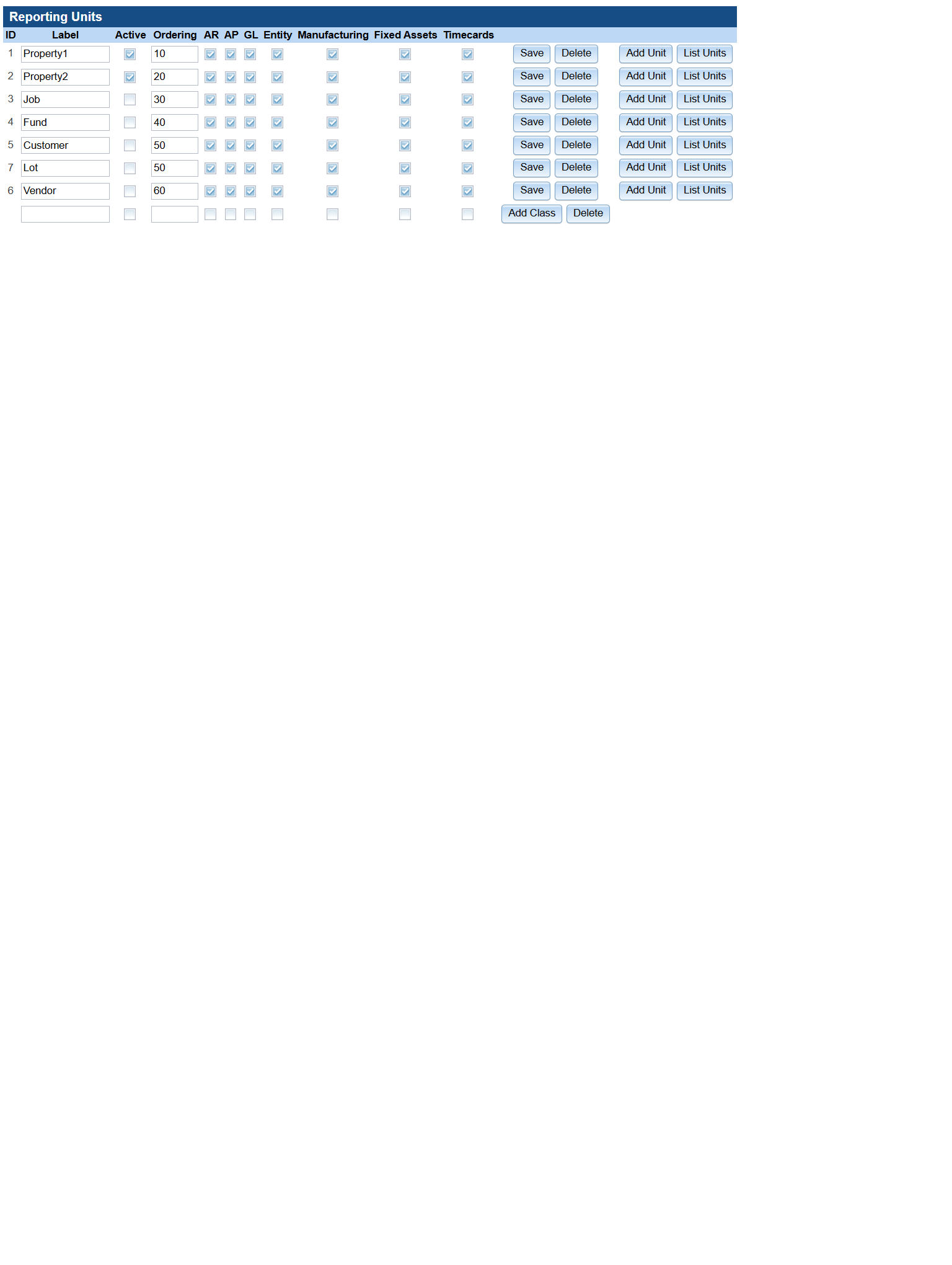

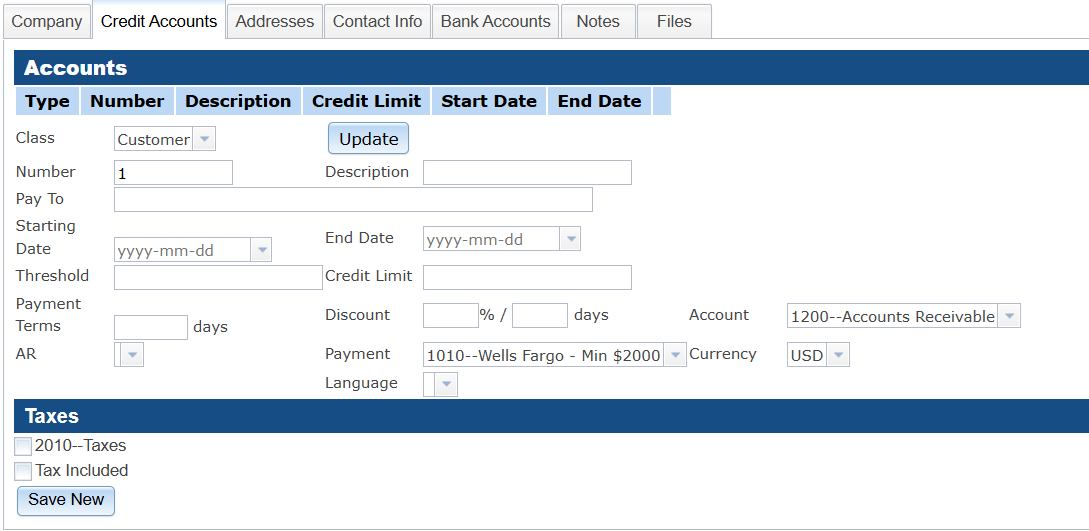

Neil A, You do not want to click "Update" here!. Not sure what that does because I don’t use it. 1. Enter 1 as you indicated below 2. Then enter a description 3. Then enter a Pay To 4. Then click “Save New” at the bottom In addition, I would NOT use "Property 1" and "Property 2" as Reporting Unit Class names. Please change the Reporting Unit Class with ID 1 back to “Department”. We’ve found in the last day or so that this is hardcoded in a couple of places. Then use the “Add Class” button at the bottom to add a class named “Properties”. Then use "Add Unit” to add one reporting unit for “Property 1” and one reporting unit for “Property 2” to the reporting unit class “Properties" I’ve rewritten he section on Reporting Units (was Departments) in the book and it should be live in a few hours for the development version of the book. Hope this helps, Neil T
On Aug 19, 2026, at 10:34 PM, Neil Aggarwal <neil@propfinancing.com> wrote:
Departments and Projects have been generalized into "Reporting Units"
OK, I created two reporting units and made them active. See the attached screenshot.
Next, I am trying to figure out how to record a payment for them. According to the book https://book.ledgersmb.org/dev/split-book/sec-business-processes-payment-pro...
I can go to Cash & Banking > Receipt and enter a single transaction for a customer. Looking further, a customer is a contact with a customer credit account.
I added two contacts, see attached.
But, when I try to add a customer credit account to Property1, I enter 1 in the customer number field and hit Update. The screen reloads and deletes the information I typed.
Thank you, Neil
-- Neil Aggarwal, (972) 834-1565, https://propfinancing.com <https://propfinancing.com/> We offer 30 year loans on single family houses!
-----Original Message----- From: Erik Huelsmann <ehuels@gmail.com> Sent: Wednesday, August 19, 2026 5:12 PM To: neil@propfinancing.com Cc: users@lists.ledgersmb.org Subject: Re: [ledgersmb-users] Don't see departments under System menu
Hi Neil,
On Wed, Aug 19, 2026 at 11:57 PM Neil Aggarwal <neil@propfinancing.com> wrote:
According to the manual, I should see a Departments option under the System menu: https://book.ledgersmb.org/dev/split-book/sec-company-config-system-me nu.html#subsec-company-config-departments
than just "departments" or "projects", as you can see under "System > Reporting Units". They have to be explicitly enabled and then declared relevant for various parts of the application: Sales(AR+Orders)/Purchases(AP+Orders)/GL/Fixed Assets/Manufacturing. These checkmarks indicate whether the dimension will show up on data entry and search screens for that type of functionality.
But, when I look at my system menu, I do not see that option, see attached.
Any idea why it is missing?
Yes: an update to the book. This book-mismatch is now tracked via: https://github.com/ledgersmb/ledgersmb-book/issues/155
Thanks for reporting! We'll address asap.
-- Bye,
Erik.
http://efficito.com -- Hosted accounting and ERP. Robust and Flexible. No vendor lock-in. <reportingUnits.png><contacts.png><creditAccount.png>_______________________________________________ users mailing list -- users@lists.ledgersmb.org <mailto:users@lists.ledgersmb.org> To unsubscribe send an email to users-leave@lists.ledgersmb.org <mailto:users-leave@lists.ledgersmb.org>
neil wrote:
I’ve rewritten he section on Reporting Units (was Departments) in the book and it should be live in a few hours for the development version of the book.
Actually there are more changes in the development version but you can find the Reporting Units update in the 1.12 and 1.13 versions of the book. They've been uploaded now.
participants (4)
-
 Erik Huelsmann
 -
 neil
neil -
 Neil Aggarwal
 -
neil@fairwindsoft.com